
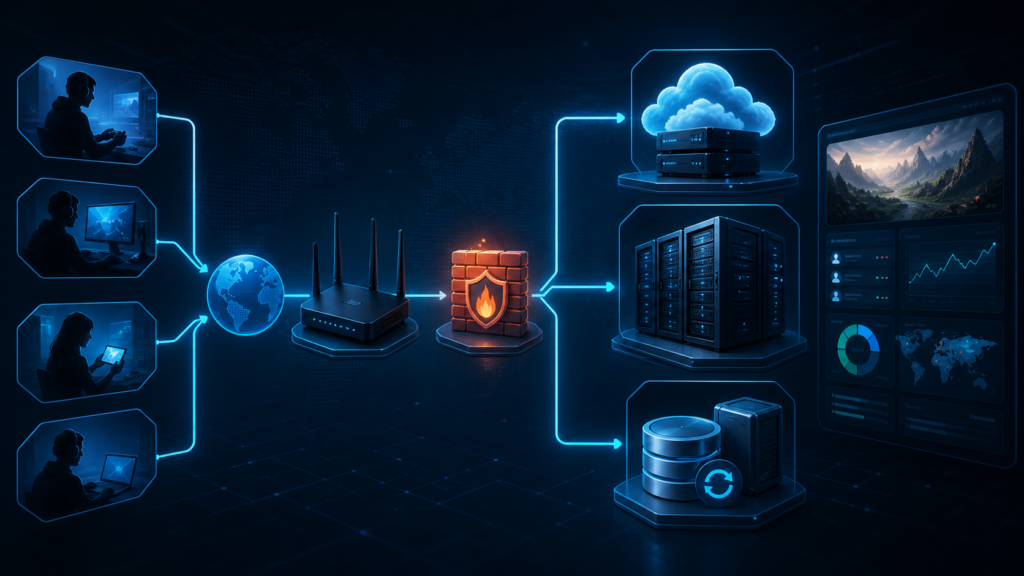
Beginner’s Guide to Setting Up a Private Game Server
A private game server gives you more control over how you play: your rules, your mods, your whitelist, your community and your world. But beginners often run into the same problem immediately — they do not know whether to host at home, rent a VPS, buy managed hosting or jump straight into a dedicated server.
This guide explains the basics without turning into server-admin fog soup. You will learn when a private server makes sense, which hosting model to choose, whether Windows or Linux is better, what ports and backups mean, and what to check before inviting your friends or community.
Private game servers sound complicated at first, but the idea is simple: instead of joining a public server controlled by someone else, you run or rent the server that players connect to. That server can host a shared Minecraft world, a survival game, a roleplay project, a competitive practice environment, a modded community or a small friend-only space.
The tricky part is choosing the correct setup. Many beginners either buy too much too early or try to self-host everything without understanding uptime, router settings, ports, security and backups. A private server is fun when it works. It becomes pain when nobody can connect, the world corrupts, the server lags or the admin password leaks into the wrong hands.
That is why the best approach is not “buy the biggest server.” The best approach is to match your hosting model to your goal, player count, budget and technical comfort.
What Is a Private Game Server?
A private game server is a multiplayer server controlled by you, your team or your community. You decide who can join, which settings are used, what mods or plugins are installed, how backups are handled and which rules apply.
“Private” does not always mean secret. It can mean invite-only, whitelisted, password-protected, community-managed or simply independent from official public matchmaking. A Minecraft world for five friends and a 200-player roleplay server are both private servers, but they need very different infrastructure.
Small Friend Server
Best for 2–10 players, casual sessions, shared worlds and low-pressure testing.
Gaming Community Server
Best for Discord groups, clans, roleplay projects and small public communities.
Modded Server
Best for custom gameplay, plugins, modpacks, admin tools and more control.
Practice or Event Server
Best for scrims, tournaments, training sessions, custom maps and private events.
When Is It Worth Hosting Your Own Server?
Hosting your own private game server is worth it when you want control. That control can mean a private world, custom rules, mods, a whitelist, a stable place for your community or independence from random public servers.
It is especially useful when you want:
- a persistent world that stays available between sessions;
- custom rules, difficulty, plugins or mods;
- admin tools for bans, whitelists, backups or logs;
- a safer place for friends, viewers or community members;
- scheduled events, roleplay, tournaments or private testing;
- less dependence on random public server admins.
It may not be worth it if you only play once a month, hate technical maintenance or just want the fastest possible setup. In that case, managed hosting or official options such as Minecraft Realms may be better than running everything yourself.
Home Hosting vs VPS vs Cloud VM vs Dedicated Server
The hosting model is the most important decision. It affects cost, performance, complexity, uptime, security and how much responsibility falls on you.
| Hosting Model | Best For | Main Advantage | Main Risk | Beginner Recommendation |
|---|---|---|---|---|
| Home hosting | 2–10 friends, short tests, LAN-style groups | Cheap start, full control, no monthly server bill | Uptime, port forwarding, home internet limits, possible IP exposure | Good for testing, not ideal for public communities |
| Managed game hosting | Beginners who want an easy panel | Fast setup, simple controls, less admin work | Less flexibility, provider limits, higher cost per resource | Best if you want to play more than administer |
| VPS | Small servers, learning, budget hosting | Predictable monthly cost, root/admin access, flexible setup | Limited CPU/RAM and more technical responsibility | Best learning option for serious beginners |
| Cloud VM | Projects needing snapshots, regions or scaling | Flexible resources, snapshots, cloud networking tools | Pricing and networking can become confusing | Good after you understand your workload |
| Dedicated server | Larger, modded or performance-sensitive communities | Dedicated physical resources, strong performance, no noisy neighbor | Higher cost, more responsibility, overkill for small groups | Upgrade later, not usually the first step |
A VPS is often the sweet spot for beginners who want to learn. It gives you server control without buying a whole physical machine. Managed hosting is easier if you want a control panel and less command-line work. Dedicated servers are powerful, but they make the most sense when you already have a real player base or a heavy modpack.
When Home Hosting Makes Sense
Home hosting is tempting because it feels free. You use your own PC or a spare machine, run the server software and invite friends. For a tiny group, that can work well.
The downside is reliability. If your PC is off, the server is offline. If your internet upload is weak, players lag. If port forwarding is misconfigured, nobody connects. If your ISP uses CGNAT, you may not be able to expose the server normally without extra work.

When Managed Hosting Is Better
Managed game hosting is best when you want to spend less time on Linux commands, firewall rules and updates. Many providers offer one-click installs, panels, backups and modpack support.
The tradeoff is control. You may pay more for the same raw resources, and some providers limit advanced configuration. For casual groups, that tradeoff is often worth it.
When a VPS Is the Best Beginner Upgrade
A VPS is a virtual private server: a virtual machine with its own operating system, resources and network access. It is cheaper and simpler than renting a full physical dedicated server, but gives you more control than most managed panels.
A VPS is a good fit for a small Minecraft server, a lightweight survival server, a test community, a small private group or anyone who wants to learn real server administration. Start small, monitor performance, then upgrade CPU, RAM or storage when the server actually needs it.
When a Dedicated Server Is Worth It
A dedicated server is a physical machine allocated to one customer. That usually means stronger and more predictable resources than a small VPS, especially for CPU-heavy games, large modpacks or serious communities.
But dedicated servers are not magic. You still need security, updates, backups, monitoring and admin knowledge. If you are hosting for five friends, dedicated is probably overkill. If you run a growing roleplay, modded or high-population project, it can become the right move later.
Windows or Linux?
The Windows vs Linux question confuses many beginners. The correct answer depends on the game, your comfort level and the available server software.
Choose Windows if you want a familiar interface, prefer Remote Desktop, need Windows-only tools or are uncomfortable with command-line server administration. Windows is easier visually, but it can use more resources and may cost more depending on the host and license model.
Choose Linux if you want lower overhead, cheaper VPS options, SSH access, automation, scheduled scripts and a more common hosting workflow. Linux is not as scary as it looks, but it does require patience and basic command-line learning.
| Choice | Good For | Pros | Cons |
|---|---|---|---|
| Windows Server | Beginners who want GUI, RDP and familiar controls | Easier visual management, good for Windows-first tools | More overhead, licensing considerations, less common for budget VPS tutorials |
| Linux Server | VPS users, automation, Minecraft Java, SteamCMD workflows | Low overhead, common in hosting, strong scripting and automation | Requires command-line learning and careful permissions |
For an absolute beginner, Windows is easier to understand on day one. For someone willing to learn, Linux is usually the better long-term server skill. For Minecraft Bedrock, always check the official supported operating systems before choosing. For Steam-based dedicated servers, check the game’s official dedicated server documentation and SteamCMD instructions.
Minimum Technical Checklist Before You Start
Before installing anything, check the basics. This prevents the classic beginner mistake: buying a server, installing files, then discovering that the game needs more RAM, different ports or a different operating system.
- Player count: how many people will connect at the same time?
- Game type: vanilla, modded, roleplay, survival, competitive or event-based?
- CPU: many game servers care more about strong CPU performance than huge core counts.
- RAM: modpacks and large worlds usually need more memory.
- Storage: use enough space for worlds, logs, mods and backups.
- Network: check upload speed, latency and region.
- Ports: know which TCP or UDP ports the game requires.
- Firewall: open only what the game needs.
- Backups: decide where backups go before players start building.
- Updates: know how to update the server without deleting data.
- Admin access: store passwords, SSH keys and panel access safely.
For public or semi-public communities, add two more items: rules and moderation. Technical stability is not enough if players grief, cheat, harass each other or argue with staff every time a rule is enforced.
First Installation Example: Minecraft and SteamCMD
Every game has its own setup process, so this guide should not replace official documentation. But most private game servers follow the same mental model: download the server files, accept any required license or EULA, configure settings, open ports, test connection, then maintain updates and backups.
Example 1: Minecraft Java Server
Minecraft Java is one of the most common beginner server projects. The basic flow is simple, but the details matter. You need Java installed, you need to run the server file, accept the EULA, configure the world and open the right port if players connect from outside your network.
1. Install Java on the server.
2. Download the official Minecraft Java server file.
3. Run the server once to generate files.
4. Review and accept the EULA if you agree to it.
5. Edit server.properties carefully.
6. Add whitelist or operators if needed.
7. Open the required port in the firewall/router.
8. Start the server and test with one friend.
For a small friend group, a managed Realm or managed Minecraft host may be easier. For modded Java servers or more control, a VPS or dedicated server becomes more attractive.
Example 2: Minecraft Bedrock Dedicated Server
Minecraft Bedrock Dedicated Server has separate Windows and Linux options. The official Bedrock download page lists Windows and Ubuntu requirements, so always use the official page before choosing a host or operating system.
Bedrock can be a good choice when your players are on Bedrock Edition platforms, but do not assume Java and Bedrock server hosting are identical. Editions, client compatibility, plugins, modding expectations and tooling can differ.
Example 3: SteamCMD-Based Dedicated Server
SteamCMD is Valve’s command-line tool used to install and update many Steam-based dedicated servers. The exact app ID, login method and launch command depend on the game, so the safest workflow is to check the Valve Developer Community page and the game-specific dedicated server documentation.
1. Install SteamCMD.
2. Create a separate server user or directory.
3. Log in anonymously or with an account if the game requires it.
4. Install the game server app using the correct app ID.
5. Configure server files, map, password and admin settings.
6. Open the required ports.
7. Start the server with the correct launch parameters.
8. Update regularly through SteamCMD.
The big advantage of SteamCMD is repeatability. Once you understand the update process, you can keep the server files current without manually downloading packages from random websites.
Security, Backups and Admin Basics
Security is where many beginner servers fail. The server works, friends join, everyone is happy — then one bad update, wrong permission or missing backup ruins the world. Do the boring things early. Future you will send snacks.
- Use strong passwords and do not reuse them from other accounts.
- Use SSH keys for Linux servers when possible.
- Do not run game servers as root/admin unless documentation specifically requires it.
- Open only the ports required by the game server.
- Keep the operating system and server software updated.
- Use a whitelist or password for private communities.
- Back up worlds, configs, plugins and permission files regularly.
- Store at least one backup outside the main server.
- Document who has admin access.
- Use logs to investigate problems instead of guessing.
Backups are not optional. If players spend hours building, progressing or creating a roleplay world, the server data becomes valuable. A proper backup plan should include frequency, storage location and restore testing. A backup you never tested is only a hopeful file with good vibes.
For a small server, daily backups may be enough. For active communities, consider more frequent backups, especially before updates, mod changes, plugin changes or major events.
Common Problems and Quick Fixes
Most first-server problems fall into predictable categories. Start with the simplest explanation before rebuilding everything from zero.
| Problem | Likely Cause | Quick Check |
|---|---|---|
| Friends cannot connect | Wrong IP, closed port, firewall rule, router port forwarding, CGNAT | Check local connection first, then firewall, then router or cloud security rules. |
| Server appears offline | Server process crashed or wrong startup command | Check logs, console output and whether the server is listening on the expected port. |
| High lag or rubber-banding | Weak CPU, low RAM, bad region, too many mods or poor upload speed | Monitor CPU/RAM usage and test with fewer players or mods. |
| World rollback or data loss | Improper shutdown, crash or missing backups | Stop the server cleanly and schedule automatic backups. |
| Mods or plugins break | Version mismatch or conflicting dependencies | Check game version, plugin version and dependency requirements. |
| Players complain about permissions | Bad role setup, unclear admin rules or permission plugin mistakes | Test permissions with a non-admin account before public launch. |
When troubleshooting, change one thing at a time. If you edit the firewall, update mods, change the startup command and restart the router all at once, you will not know what fixed or broke the server. Server admin is half logic, half patience, and 12% staring at logs like they owe you money.
Best Beginner Setup Recommendations
Here is the practical version:
- For 2–5 friends: use Realms, managed hosting or home hosting for short tests.
- For 5–20 players: use managed hosting or a small VPS.
- For learning server admin: use a Linux VPS and start with one simple game server.
- For modded Minecraft: choose more RAM than vanilla and keep backups before every major change.
- For public communities: avoid home hosting and use a VPS, cloud VM, managed host or dedicated server.
- For larger roleplay or heavily modded projects: consider a dedicated server after testing real usage.
The winning move is not to buy the biggest machine. It is to start with a setup you can understand, maintain and back up. A smaller stable server beats a powerful unmanaged server that nobody knows how to fix.
FAQ: Private Game Servers
What is a private game server?
A private game server is a multiplayer server controlled by you or your group. It can be hosted at home, on a VPS, on a cloud virtual machine, on a dedicated server or through a managed hosting provider.
Should beginners use a VPS or a dedicated server?
Most beginners should start with a VPS or managed game hosting. A dedicated server is usually better for larger, heavily modded or performance-sensitive communities.
Is Linux or Windows better for game servers?
Linux is often better for low-cost VPS hosting and automation, while Windows is easier for users who prefer a graphical interface or need Windows-specific server tools.
Do I need port forwarding for a private game server?
You usually need port forwarding when hosting from home. Cloud VPS and dedicated servers usually use firewall or security group rules instead.
Can I host a game server on my own PC?
Yes, but it is best for testing or small friend groups. Your PC must stay on, your internet upload must be stable and you may need router port forwarding.
How much RAM does a game server need?
It depends on the game, player count, world size and mods. Vanilla servers usually need less RAM than modded or plugin-heavy servers. Always check the official server requirements first.
What is SteamCMD used for?
SteamCMD is Valve’s command-line tool for installing and updating many dedicated game servers available through Steam.
Are backups really necessary for a small server?
Yes. Even a small server can lose worlds, configs or player progress after crashes, bad updates or accidental deletion. Backups are one of the first things to set up.
Final Thoughts: Start Simple, Then Upgrade With Evidence
A private game server can turn a game into a shared home for friends or a real online community. But the best beginner setup is not the most expensive one. It is the one you can understand, secure, back up and maintain.
Start with your real goal. If you only need a simple private world, managed hosting or Realms may be enough. If you want to learn and control everything, a VPS is a smart next step. If your server grows into a serious project with mods, events and dozens of active players, then a dedicated server starts to make sense.
Build the foundation first: correct hosting model, clear rules, safe admin access, working ports, tested backups and a small group of players who can help you test. Once that is stable, scaling becomes much easier.
- Minecraft Java Server Download
- Minecraft Help: How to Setup a Java Edition Server
- Minecraft Bedrock Dedicated Server Download
- Minecraft Realms
- Valve Developer Community: SteamCMD
- Valve Developer Community: Dedicated Servers List
- AWS Lightsail: Virtual Private Server Instances
- Microsoft Azure: Virtual Machine Sizes
- OVHcloud: What Is a Dedicated Server?
- Microsoft PlayFab: Connecting Clients to Game Servers
Further Reading
- How to Start Your First Online Gaming Community — Build the community around your server with better onboarding, rules, events and moderation.
- Why Gaming Communities Are More Important Than Ever — Understand why communities now drive discovery, retention and long-term gaming engagement.
- Biggest Upcoming Games to Watch in 2026 — Explore the major 2026 game releases across console and PC.
More in Esports & Competitive Gaming
